Build a clearer financial picture
Kellen Finance Dashboard · An independent application by Kelun Wang
A bank statement answers what happened in one account. Managing money across checking, savings, credit cards, and brokerage accounts requires a different view: what is available, what is owed, where spending is accumulating, and which records explain the total?
I built Kellen Finance as an independent application around those questions. The work combines financial definitions, data integration, interface design, and local operations. A useful dashboard needs more than attractive charts: the same purchase should not become a second expense when I pay the credit card, and a balance should remain distinguishable from the transactions that moved it.
Start with the decisions
The design centers on three jobs. First, establish a position across the accounts loaded into the application. Second, understand spending and cash movement over time. Third, move from a summary back to the transactions that need attention.
This led to a deliberate separation of balances, flows, and classifications. Bank cash, investment value, and card debt have different meanings. A brokerage valuation is not immediately spendable bank cash. Transfers move money between accounts; they should not automatically increase consumption. A merchant total is useful only if I can inspect the underlying activity.
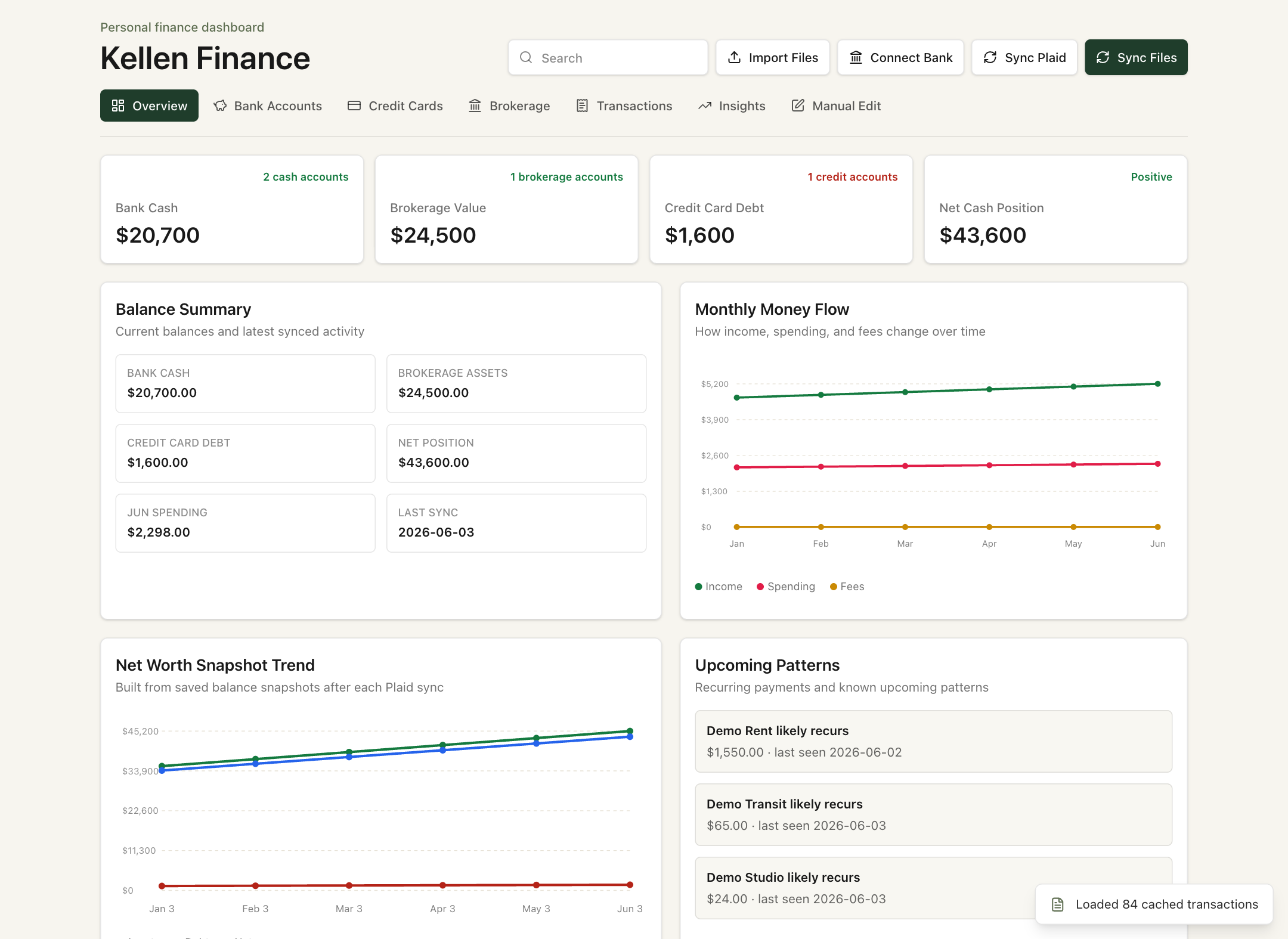
The overview brings those questions together. Its net-position calculation combines cash and investment assets, then subtracts card balances. That is a view of the loaded accounts, not a complete household balance sheet or a liquidity forecast. The monthly summaries use the latest month present in the transaction data; an incomplete month remains incomplete.
Make each screen earn its place
The feature branch has seven views. Each adds a different level of detail to the same underlying dataset.
| View | Information displayed | Decision it supports |
|---|---|---|
| Overview | Account totals, spending, money flow, balance trends | Identify which part of the financial picture needs attention |
| Bank Accounts | Cash balances, inflows, expenses, card payments, fees | Separate operating cash movement from consumption |
| Credit Cards | Balances, purchases, refunds, categories, activity | Review obligations and spending across cards |
| Brokerage | Holdings, quantities, prices, values, asset mix, snapshots | Inspect investment exposure and account composition |
| Transactions | Multi-select filters, search, source and classification detail | Investigate an amount instead of trusting a summary blindly |
| Insights | Merchant rankings, category totals, large transactions, recurring candidates | Find spending patterns worth reviewing |
| Manual Edit | Selected exclusions and saved monthly allocation totals | Keep a personal analytical view of shared expenses |
The manual workflow saves a selection layer separately from imported transactions. It changes the analytical view without rewriting the source purchase. This distinction matters: excluding a shared expense from a personal summary does not change the amount legally owed to a card issuer.
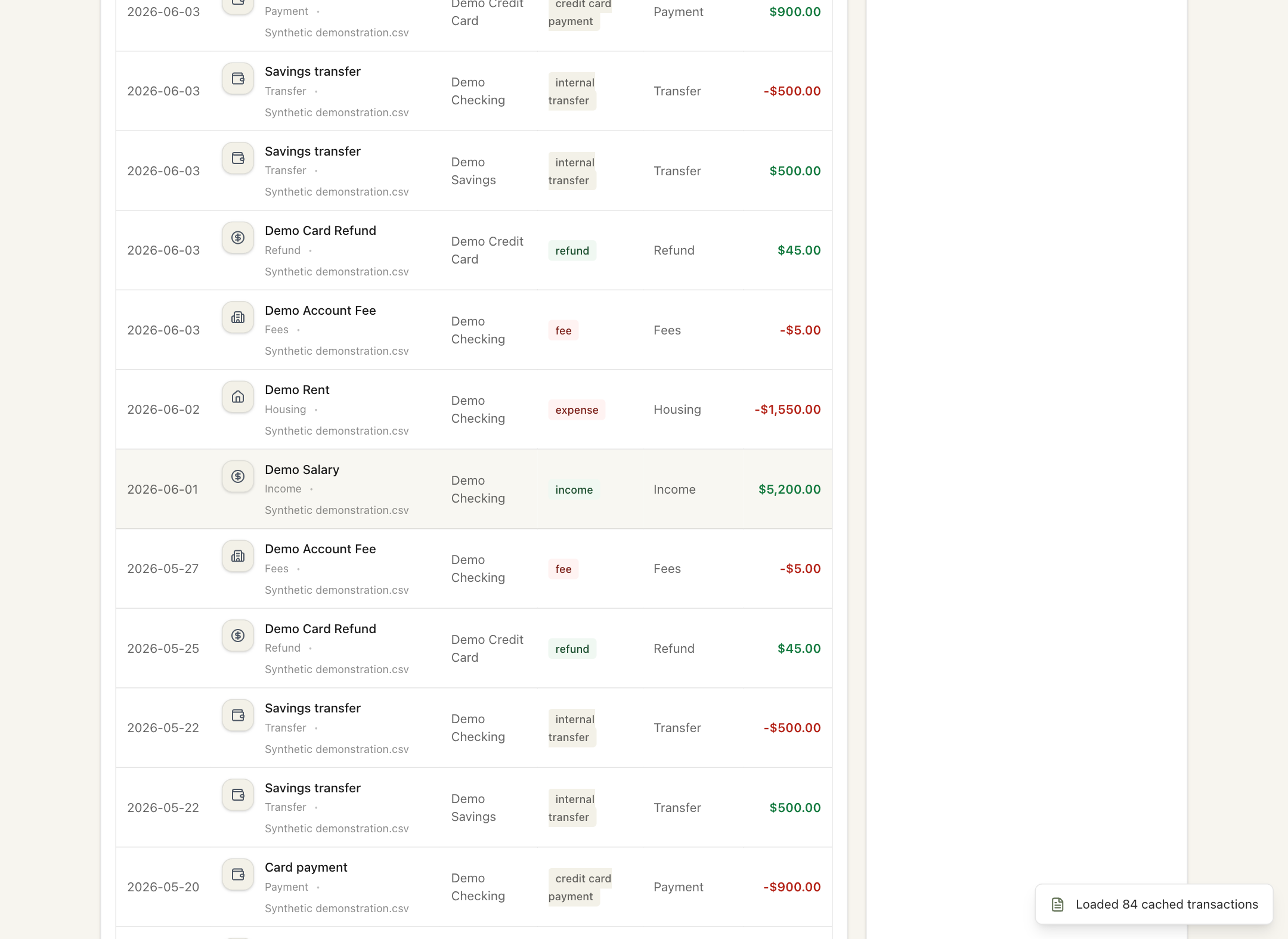
The product logic is to reduce the distance between a question and its evidence. A category total can prompt a merchant review; a surprising amount can prompt a source check. Multi-select filters make cross-account comparisons possible without repeatedly changing one dropdown at a time.
Build one model for several sources
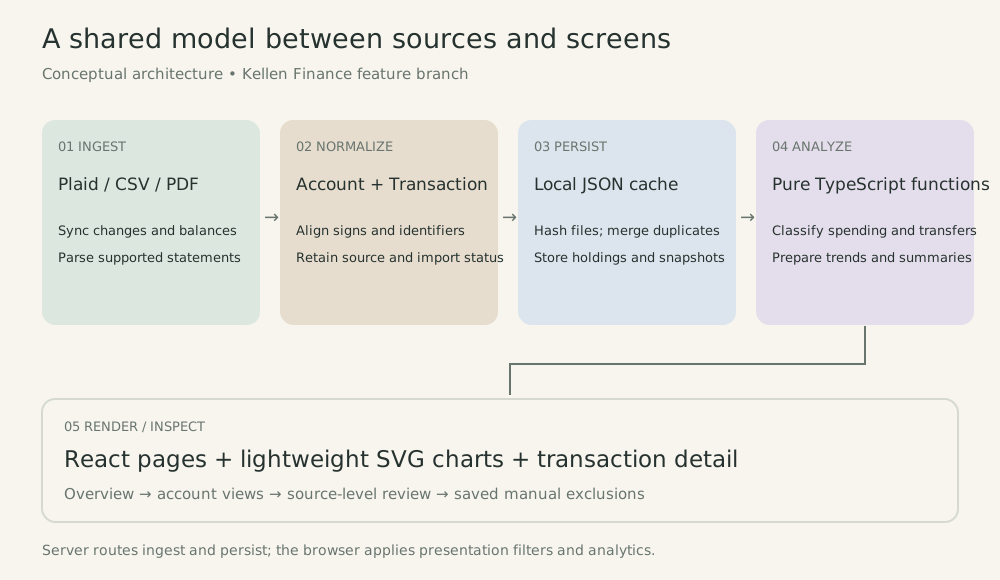
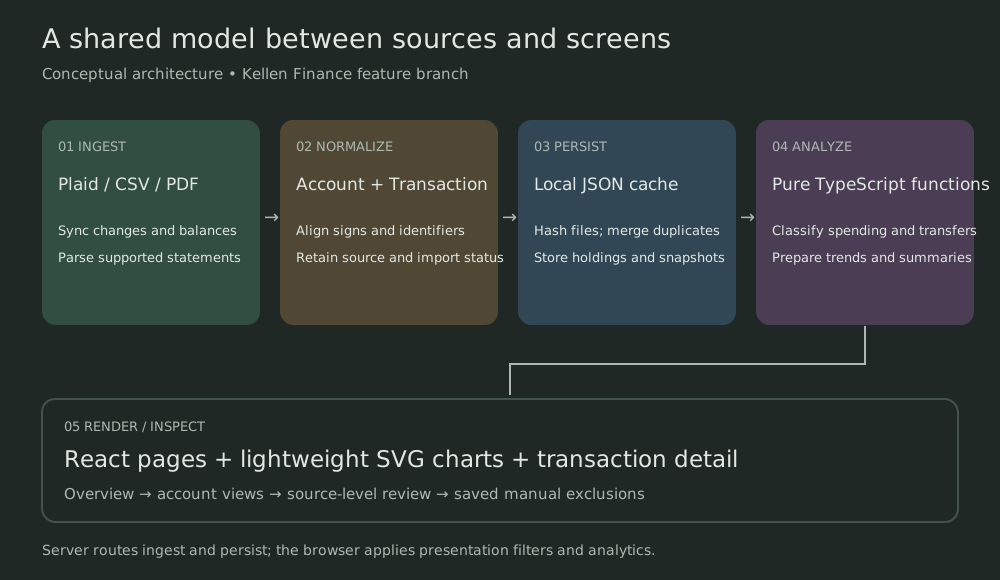
The application accepts supported CSV and PDF statement formats and includes a Plaid connection path. These inputs do not arrive in a common shape. Headers, debit signs, account names, posting dates, and categories vary.
A normalization layer translates them into shared TypeScript types such as Account, Transaction, InvestmentHolding, and BalanceHistoryPoint. Transactions retain their source, account, date, amount, category, and transfer flag. Server routes handle import and synchronization; the local cache holds normalized records. The browser then prepares filtered analytics for React pages.
Overlapping imports need an explicit rule
File hashes detect unchanged statement imports. Transaction matching checks identifiers and uses amount, date, account, and description heuristics to recognize overlap. When sources overlap, the following function establishes the preference order:1
export function getTransactionSourcePriority(transaction: Transaction) {
  if (isPlaidTransaction(transaction)) {
    return 3;
  }
  if (transaction.sourceFile.toLowerCase().endsWith(".csv")) {
    return 2;
  }
  return 1;
}
The order is Plaid, then CSV, then other parsed sources. It gives merging a consistent rule when the same activity arrives through multiple paths. It is not proof that the preferred record is correct: same-amount purchases near one another can be legitimate separate transactions. That makes inspectable sources and reconciliation checks as important as deduplication itself.
Define spending before drawing a chart
The spending series starts with this short filter:2
const spendTransactions = transactions.filter(
  (transaction) => getTransactionType(transaction) === "expense",
);
The classifier distinguishes expenses from card payments, internal transfers, refunds, fees, and other transaction types. For a simple illustration, a $120 card purchase followed by a $120 bank payment creates two outgoing records across the accounts. Adding negative amounts would report $240; the expense filter keeps the purchase at $120 and treats the repayment separately. Fees have their own summaries, so “spending” here is not every possible economic cost.
This is the connection between business reasoning and implementation: a financial definition becomes a reusable rule. The same analytical functions supply category totals, merchant rankings, and time-series views, reducing the risk of different pages inventing different definitions.
Preserve history as observations arrive
Plaid synchronization processes added, modified, and removed transactions. The later branch also stores account balance snapshots and investment holdings. This enables a history of observed positions rather than reconstructing historical wealth from today’s balance.
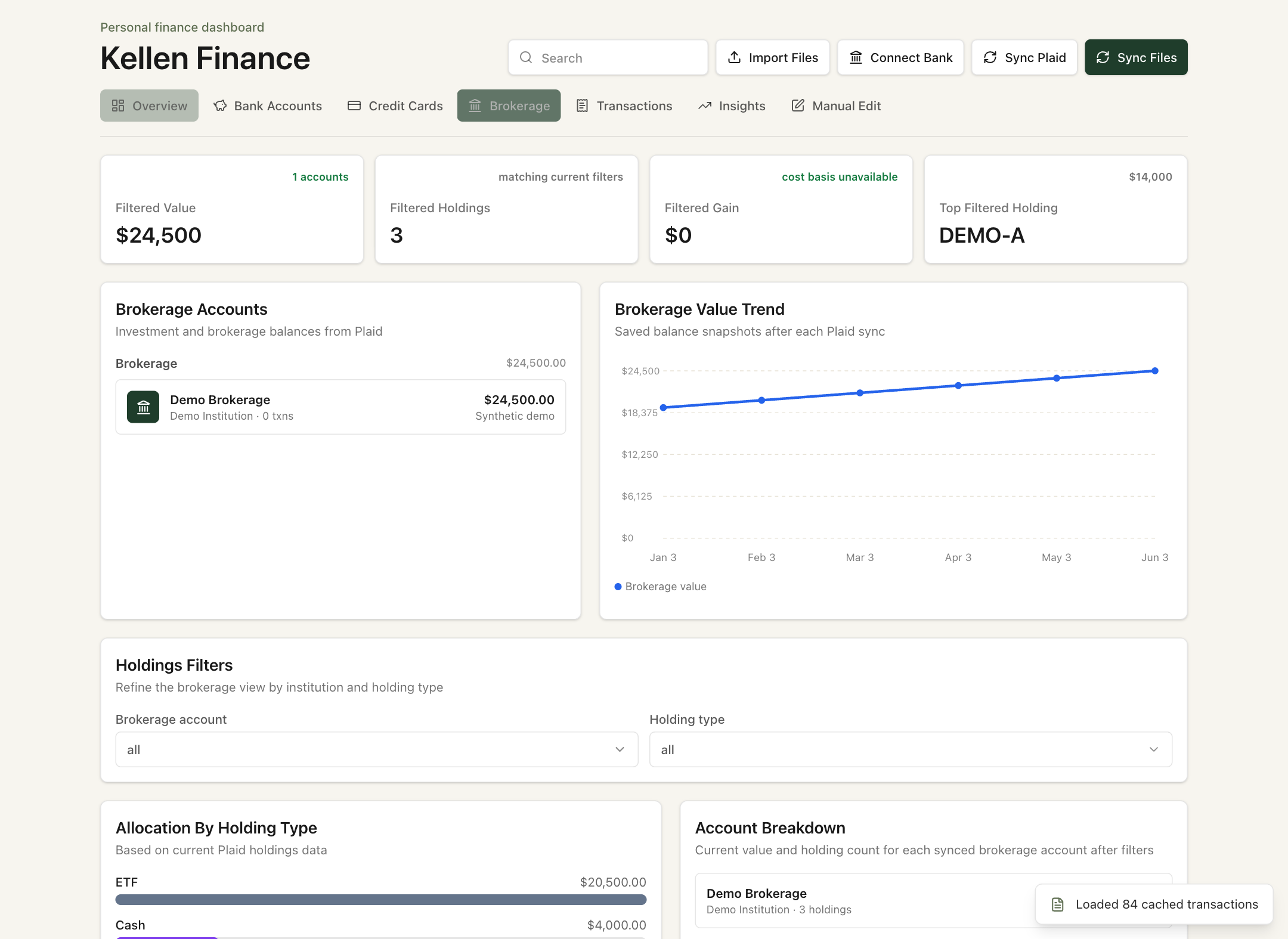
Holdings availability depends on the connected institution and permitted data access. Prices and balances reflect the supplied observations; this is not a live market-data terminal. A change in the balance trend can include deposits and withdrawals as well as market movement, so it should not be labeled investment return.
Evolve the product without losing the baseline
The repository records a small, concrete development history. There is one tagged release, v0.1.0. Later work sits on ui-filters-and-merchant-logos; it is not a second released version.3
May 28 · Application foundation
b80f863 establishes the Create Next App scaffold. This is the starting point of the repository, not evidence of a finished finance product.
June 2 · Stable baseline
a79b0d3 introduces the working dashboard, ingestion routes, shared financial model, local cache, Plaid synchronization, and architecture notes. Both main and the v0.1.0 tag point to this checkpoint.
June 3 · Broader inspection and control
329ccda adds multi-select filters and merchant identity cues, alongside brokerage holdings, balance-history views, and saved manual selections. It also narrows bank-fee aggregation to the relevant cash transactions and month, keeping that summary consistent with its scope.
June 3 · Repository cleanup
986e667 removes an accidentally included duplicate source file. This is the feature-branch snapshot shown in the screenshots above; it remains separate from main in the reviewed repository.
The branch preserves a stable reference while the application expands. Commit hashes identify exactly which implementation a screenshot or issue refers to, and the tag gives the baseline a memorable name. The cache separately evolves from schema version 1 to version 2 to accommodate snapshots and holdings; that internal schema number is distinct from a product release.
The repository includes scripts for smoke checks, linting, type checking, and builds, plus a dependency lockfile. These are tools for checking a checkpoint, not evidence of an automated release pipeline. The current build configuration skips TypeScript errors, so a successful build alone would not establish type correctness. Keeping explicit checks and documenting branch status are part of making an iteration reviewable.
What I would improve next
This is a local personal tool with a focused scope. The next improvements follow from the decisions it needs to support:
- Reconciliation: test duplicate matching and transaction classification against known statement totals, especially payments, refunds, and repeated same-amount purchases.
- Freshness: distinguish the last transaction date from the last successful sync, and make partial-month coverage clearer.
- Scale: move the JSON cache toward SQLite and query summaries on the server. The transaction view currently displays at most 200 matching rows while the application loads the broader dataset.
- Reliability: add recoverable sync checkpoints and a repeatable validation gate before promoting feature work to the stable branch.
Recurring-payment detection is currently a merchant-and-amount heuristic, not a billing forecast. Manual editing is a selected-exclusion workflow, not general category editing. Those boundaries help keep the interface’s claims aligned with what the implementation can support.
The strongest outcome of the project is the working connection between a financial question, a data rule, and an inspectable interface. It demonstrates how I approach an independent build: define what a number means, implement the path that produces it, and keep enough history to understand how the product changed.
Source and demonstration notes
This article reviews the private Dustin-Liv/kellen-finance repository at a79b0d3 (main, v0.1.0) and 986e667 (feature branch). Code excerpts are from that implementation, with whitespace normalized. The architecture diagram is explanatory; all screenshot data is synthetic. The demo was rendered from the actual application with its API responses intercepted, without connecting financial accounts or loading personal statements. No time savings, investment performance, or commercial adoption are claimed.
Demo fixture · Screenshot reproduction · Architecture figure code
Footnotes
src/lib/finance.ts,getTransactionSourcePriority; merging and file hashing insrc/lib/database.ts, reviewed at986e667.↩︎src/lib/dashboard-analytics.ts,buildAnalyticsandgetTransactionType. Page composition and filtering insrc/components/dashboard/pages.tsxandsrc/components/FinanceDashboard.tsx.↩︎Git commit graph, tag references, and diffs in
Dustin-Liv/kellen-finance; dates shown in Pacific time. Repository architecture notes describe SQLite as future work, while the implemented cache remains JSON.↩︎